Free on the App Store for iPhone and Apple Watch. Left. Pro is $9.99, once.
How it works
How much can I spend today?
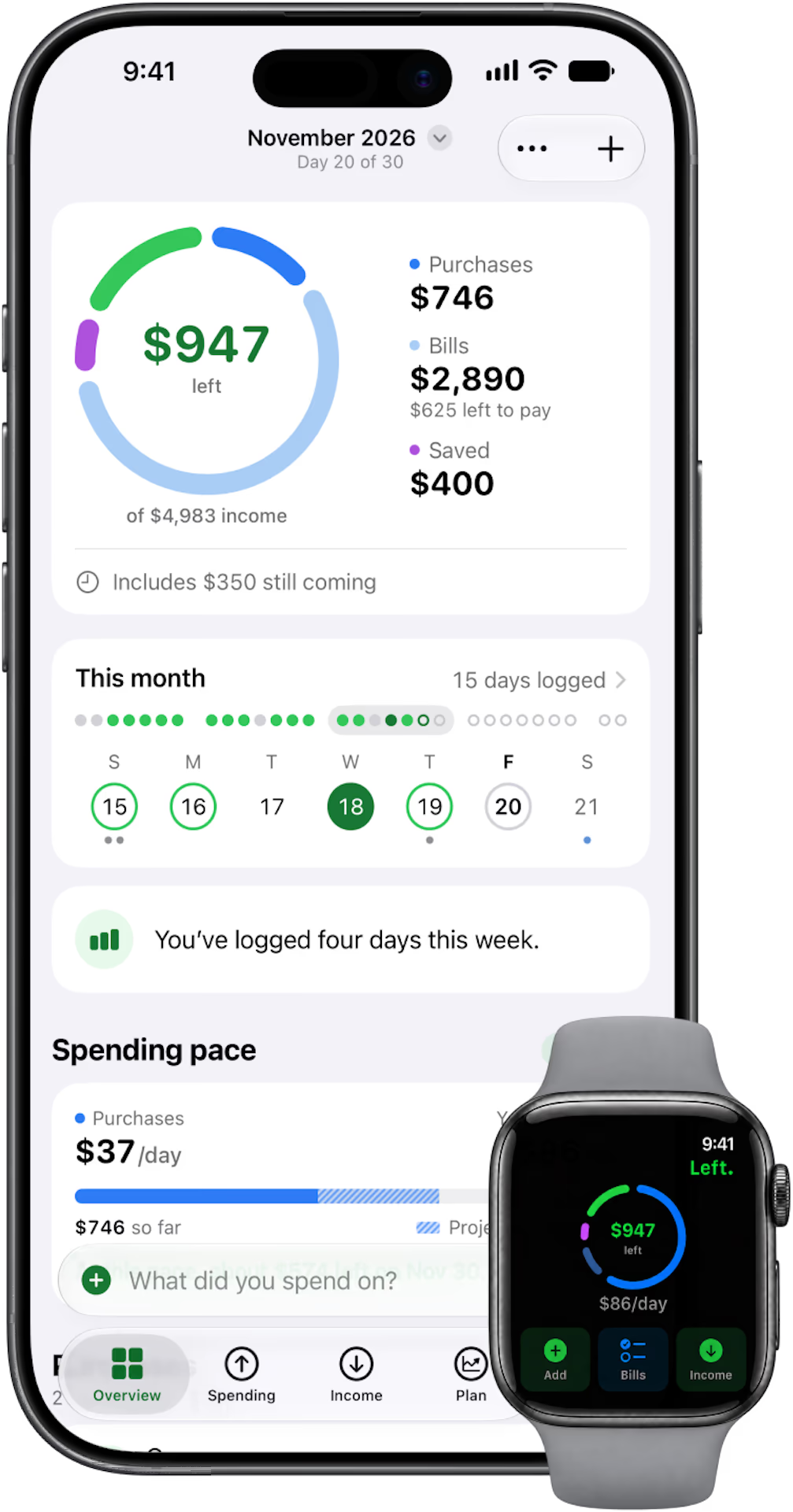
Purchases, bills and savings in one ring, and what’s left in the middle.
Add your income and bills. Each month starts with a full ring, and it shrinks as you spend. The number in the middle is what’s left for the month, broken into a daily amount.
$947left
of $4,983 income
$86/day for 11 days
Spending
Know what’s due and what’s spent.
Bills carry over each month. Purchases take seconds.
Bills sit in two lists, still to pay and paid. Copy a bill into a new month once, and it carries over on its own after that. Logging a purchase yourself makes you notice it, and Left. makes it take seconds: type what you spent into the bar at the bottom, scan the receipt, or tell Left Assist. Search finds any purchase or bill by name or amount.
This November: four bills still to pay, $625 in all, with Electric & gas due tomorrow, and seven already paid.
Categories
See where your money goes.
Every category, with limits where you need them.
Categories sits right in Spending and compares this month with last month as of the same day, so you’re never measuring half a month against a whole one. Set a limit where it helps, and pick categories from a grid, including Shopping, Entertainment, and Gifts & Donations.
Here: $3,636 in all, $58 less than this time in October. Food & Groceries is at $509, with $191 left of its limit.
Income
Every payday, planned.
Paychecks and side gigs, counted before they land.
Set up recurring income once and Left. lines up the paychecks you expect. When one lands, tap to confirm it, so what’s left stays true. Freelance work and other one-off income sit right alongside.
Here: two $2,273.42 paychecks and $86 from an Etsy shop received, and $350 of freelance work waiting to be confirmed.
Habits
A minute a day.
Watch your month fill in. Earn awards along the way.
No streaks, no guilt: every week starts fresh.
This month
15 days logged
SNov 15, logged
MNov 16, logged
TNov 17, not logged
WNov 18, no spending
TNov 19, logged
FNov 20, today, not logged yet
SNov 21, a bill is due
You’ve logged four days this week.
TodayNot logged yet
Spent nothing? That counts.
Mark the days you spent nothing, and they fill in too.
An evening check‑in, if you want one
Add a purchase or mark No Spending Today right from the notification, on iPhone or Apple Watch.
Awards and a weekly look back
Earn awards as you go, and get a look back each week.
Left Assist
AI that stays on your iPhone.
Ask for advice or add a purchase.
Your conversations aren’t saved, and nothing in your budget changes until you tap.
Ask what to do
Get up to three ideas for the rest of this month or the month ahead, worked out on your iPhone from your own numbers.
What should I do this month?
What should I do next month?
Talk or type
Tap the mic and say “coffee 4.50”, then add it with a tap. Your voice never leaves your iPhone, and the audio is never saved or sent anywhere. Voice input is in English.
Lunch 14 and gas 40
Coffee 4.50
Add, change, or delete
Left Assist can add, change, or delete purchases and bills, just by asking. Nothing changes until you tap Update or Delete, and deletes can be undone.
make that 5.50
delete that
Ask in plain words
Ask what’s due before payday, what you spent at a store this month or last, or whether anything looks unusual.
Am I on track this month?
How much is due this week?
How does this month compare to last month?
Plan, then look back
Plans are checked against your own past months, not an outside rule. On the 1st, Month in review shows how last month went and one thing to try next.
Help me save $3,000 by May
Help me spend less on food
Left Assist is free for everyone. It logs purchases and answers most questions with calculations on any iPhone that runs Left. Open-ended questions use Apple Intelligence, on iPhone 15 Pro and later. It doesn’t help with investing, taxes, or legal questions.
And more
More than a budget.
Receipts, search, savings goals, and the small things that make it stick.
Fills itself in as you type
Type one line, like “coffee 4.50 yesterday”, and the amount, category and date fill in. Your usual purchases wait above the keyboard, with what you paid last time. Try it here.
New Purchase
NameDate$0.00
Scan a receipt
Point your camera at a receipt and Left. fills in the store, total and date, right on your iPhone.
Market · $48.20
Spending pace
See where your purchases are heading before the month ends: On track or Over pace.
$37/dayOn track
$746 so farto Nov 30
At this pace, about $574 left on Nov 30.
Savings goals
Set money aside for what matters. Left. keeps it out of what’s left, and shows the month you’re on pace to reach each goal.
Emergency fund$300.00 saved
Search the month
Search finds any purchase or bill, by name or by amount.
coffee
CoffeeToday$6.45
CoffeeNov 18$7.10
Log a purchase from anywhere
Add one without opening the app, from wherever your hand already is.
Left Assist
Lock Screen
Action button
Control Center
Widgets
Siri
Apple Watch
Shortcuts
Calculator
Your currency
More than 150 currencies, or Automatic to follow your Region. Amounts are never converted. Only the symbol changes, so 1,250 stays 1,250.
$€£¥₹₩₺R$₱złCHF₪
Bills carry over on their own
Copy a bill into a new month once, and it carries over on its own after that.
November
Electric & gas$96.00
Car loan$389.00
Internet$65.00
December
Electric & gas$96.00
Car loan$389.00
Internet$65.00
At a glance
Check it without opening it.
Widgets, your Lock Screen, Apple Watch, and Siri.
Widgets
Left to Spend shows what’s left and what’s up next. Quick Add puts Add Purchase one tap away. Both work on the Home Screen and the Lock Screen.
Controls
Add Purchase and Left to Spend, ready in Control Center, on the Lock Screen, and on the Action button.
Apple Watch
The same ring and daily amount on your wrist, plus complications for your watch face. Add a purchase, mark a bill paid, and confirm income.
Siri
Ask what’s left, add a purchase, or mark a bill paid. On a locked iPhone, Siri asks you to unlock before saying any amounts.
How much is left in Left?
You have $947 left this month.
The Apple Watch app requires watchOS 26 or later.
iPhone Duo
Fits iPhone Duo.
On the closed display, the tab bar moves to a column on the right, so every screen keeps its room.
Add your debts and accounts for free. Pro turns them into a payoff plan with a debt-free date, and charts your net worth over time, for $9.99 once.
See what a little extra would do.
Add a debt for free, and Left. works out what $100 more a month would save: how much sooner you’d be done, and how much less interest you’d pay. Pro gives you the plan itself, down to a debt‑free date.
Path to debt-freeSample debts
With $100 more a month on a payoff plan
Worked out from $29,900 across 3 debts
Extra each month
8 months soonerDebt-free date in Pro
$1,051less interest
Payoff plan in Left. Pro
Pay off debt faster and smarter.
See what to pay first, and why.
Add your debts for free. With Pro, choose Highest Rate or Smallest Balance, also called avalanche and snowball, and add a little extra each month. When one debt is paid off, its payment moves to the next. Here, $200 more a month means debt-free by Dec 2029, 13 months sooner, with $1,576 less interest.
History chart in Left. Pro
Your whole financial picture.
Track assets, debt, and net worth over time.
Add what you own and what you owe for free, and see your net worth in one place. Pro adds the history chart, so you can watch the line climb. Here, $53,040 in assets against $29,900 of debt is a $23,140 net worth, up $15,502 in a year.
Free$0
Everything you need to budget.
Income, bills, and purchases
What’s left, with a daily amount
Categories, limits, and search
Savings goals
Debts, accounts, and your net worth
Habit calendar and awards
Receipt scanning
Left Assist, typed or spoken
Apple Watch, widgets, and Siri
iCloud sync
Left. Pro$9.99once
Everything in Free, plus:
Payoff plan: Highest Rate or Smallest Balance
Extra payments, payoff dates, and your debt-free date
The interest you’ll save
Net worth history chart
Debt over time, month by month
All future updates included
One-time in-app purchase. No subscription. Restore on a new iPhone with the same Apple Account.
The short version, with the rest on the support page.
Is Left. really free?
Yes. Income, bills, purchases, categories and limits, savings goals, the habit calendar and awards, receipt scanning, Left Assist, Apple Watch, widgets, Siri, and iCloud sync are all free, and so is adding your debts and accounts. Left. Pro is a $9.99 one-time purchase that adds the payoff plan, with your debt-free date, and the net worth history chart.
Is there a subscription?
No. Left. is free, and Left. Pro is a one-time $9.99 purchase with future updates included.
Why doesn’t it connect to my bank?
By design. You enter your own numbers, so there are no credentials to hand over and no third party in the middle. Logging a purchase yourself makes you notice it, and the capture bar, Left Assist, receipt scanning, Siri, and Apple Watch keep it to seconds.
Do I have to add my bills every month?
No. Copy a bill into a new month once, and it carries over on its own after that.
Will Left. nag me to log every day?
No. The evening check-in is optional, and it lets you add a purchase or mark No Spending Today right from the notification, on iPhone or Apple Watch. There are no streaks to lose: every week starts fresh.
Where is my data?
On your iPhone and Apple Watch, and in your own iCloud for sync between them. Left. has no servers of its own, no analytics, no third-party SDKs, and no ads, and the App Store privacy label reads Data Not Collected.
Does it work in Airplane Mode?
Yes. Everything you need lives on your iPhone, so Left. keeps working with no connection at all. Turn on Airplane Mode and see for yourself. Changes sync through iCloud when you’re back online.
Does Left Assist send my questions anywhere?
No. Calculated answers come from the app itself on any iPhone that runs Left. Open-ended questions use Apple Intelligence on iPhone 15 Pro and later. Either way, nothing is sent to a server, and your conversations aren’t saved.
Can I talk to Left Assist?
Yes. Tap the mic in Left Assist and say “coffee 4.50”, then add it with a tap. Your voice never leaves your iPhone: speech becomes text on the device with Apple’s Speech framework, and the audio isn’t saved or sent anywhere. Voice input is in English, and the first use may download Apple’s English speech model.
Can Left Assist change my budget?
Only when you tap. Left Assist can add, change, or delete purchases and bills, and you can just ask: “make that 5.50” or “delete that”. It always shows you what it’s ready to do first, nothing changes until you tap to confirm, and deletes can be undone.
Does Left Assist give financial advice?
It gives budget advice from your own numbers. Ask “What should I do this month?” or “What should I do next month?” and it suggests up to three things, with every figure calculated by the app. It doesn’t help with investing, taxes, or legal questions, and nothing changes until you tap.
Does it work with my currency?
Yes. Pick from more than 150 currencies in Settings, or stay on Automatic to follow your Region. Amounts are never converted. Only the symbol changes, so 1,250 stays 1,250.
Does Left. work with VoiceOver and larger text?
Yes. Left. is designed for VoiceOver, larger text sizes, and Increase Contrast.
What do I need to run it?
An iPhone on iOS 26.1 or later, iPhone Duo included, and watchOS 26 or later for the Apple Watch app. Left. and its voice input are in English. Open-ended Left Assist questions use Apple Intelligence, which needs an iPhone 15 Pro or later.
What happens when I get a new iPhone?
Sign in with the same Apple Account, install Left., and your data syncs back through iCloud. Pro restores automatically, and Restore Purchases is there if you ever need it.